



SimLab
CADVRter

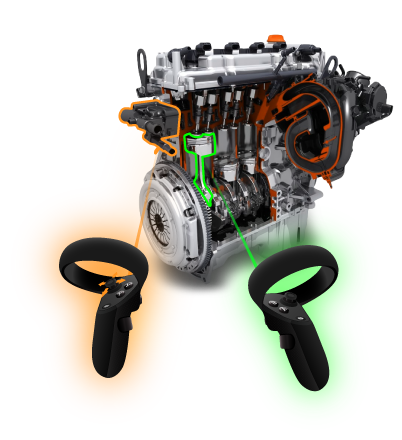
独立3D/CAD到VR转换工具–支持25+种3D文件格式,具有自动转换功能,用于3D模型可视化、工程设计审查、虚拟原型制作和CAD在VR中的可视化。

Seperator

开始免费

- 不需要信用卡,1周免费试用

- 可在 Windows 和 Mac 上使用

Seperator Seperator

为什么选择SimLabCADVRter

25+ supported file formats to read and 15+ file formats to write.

独立

在设备上本地运行,不需要其他任何东西即可正常工作。

25+ supported file formats to read and 15+ file formats to write.

隐私

导出和导入的文件由用户设备保存、管理和提供。

Very fast conversion for CAD applications, tools, including optimization and tessellation control settings.

快速且简单

用于CAD应用的快速转换,包括优化和镶嵌控制设置,只需拖放3D文件。

Animations are being preserved if they are supported by output files.

动画支持

如果3D输出文件支持动画,它们将被保留。

Import and export your models with their materials and textures

纹理支持

导入和导出您的模型及其材质和纹理。

Seperator

How SimLabCADVRter有效吗?

Laptob
SimLab支持哪些文件格式CADVRter支持吗?

支持大多数主流CAD格式,将您的文件转换为VR、AR、3D打印、交互式3D PDF导出和创建、可视化等。

25+
支持的导入文件格式



Import cad applications
Import and export, convert to SLDPRT,SLDASM

SLDPRT,SLDASM

Import and export, convert to IAM,IPT

IAM,IPT

Import and export, convert to IGS,IGES

IGS,IGES

Import and export, convert to LWO,LWG,GEO

LWO,LWG,GEO

Import and export, convert to LWS

LWS

Import and export, convert to STEP,STP

STEP,STP

Import and export, convert to 3DXML

3DXML

Import and export, convert to IFC

IFC

Import and export, convert to GOZ

GOZ

Import and export, convert to 3DM

3DM

Import and export, convert to *.xyz, *.pcd, *.e57, *.las, *.laz

*.xyz, *.pcd, *.e57, *.las, *.laz

Import and export, convert to STL and autodesk to stl

STL

Import and export, convert to SKP

SKP

Import and export, convert to autocad 3DS

3DS

Import and export, convert to FBX

FBX

Import and export, convert to U3D

U3D

Import and export, convert to DAE

DAE

Import and export, convert to OBJ

OBJ

Import and export, convert to USDZ

USDZ

convert to 3MF

3MF

Import and export, convert to DWG,DXF

DWG,DXF

Import and export, convert to DWF,DWFX

DWF,DWFX

Import and export, convert to PDF and autodesk to pdf

PDF

Import and export, convert to GLTF,GLB

GLTF,GLB

Import and export, convert to CTM

CTM

Import and export, convert to VR Package

VR软件包

Import and export, convert to OSG

OSG


Export cad applications

18+
支持的导出文件格式


CADVRter可以设置为在三种不同模式下执行自动文件转换:


  • 将相同类型的文件转换为多个输出。( 1 to Many )
  • 将多种类型的文件转换为特定输出。(多对一)
  • 将多种类型的文件转换为多种输出。(多对多)


了解更多关于CADVRter的信息
Seperator Seperator


为 VR 创建资产

SimlabCADVRter可以通过支持VR行业中所有主流文件格式,从您的设计中创建VR资产。它是一个CAD文件转换器、3D CAD到USDZ、glTF、FBX转换器、CAD到VR模型翻译器等等。



USDZ format

USDZ

GLTF format

GLTF

FBX format

FBX


engine simlab soft
LOGO pattern
购买
Seperator
Seperator
关于FAQs关于 SimLab Soft CADVRter 软件的常见问题

- 支持哪些类型和版本的文件格式?

支持的文件格式类型和版本已提到。这里。

- 文件中将包含哪些材料信息?

Textures 和 colors

- 文件是否支持纹理?

所有包含纹理的文件,无论是嵌入在文件中还是位于文件旁边,均受到支持。

- 什么信息被导出?

几何体、材料和纹理。

- 我可以对导出格式进行哪些控制?

默认设置应自动适用于大多数模型,不同的设置可用于每种文件格式。

- 使用Simlab CADVRter有多安全?

由于Simlab CADVRter在您的设备上本地执行转换,因此无需将文件上传到外部服务器。

- 为什么选择Simlab CADVRter?

  • 快速且值得信赖
  • 多功能性
  • 用户友好的界面
  • 灵活

CADVRter可以将哪些3D CAD文件格式转换为VR?

CADVRter可以导入超过30种3D文件格式,包括SLDPRT、IGS、LWO、GOZ、STEP、FBX、3DS、PDF、DEA和OBJ,并将它们导出为3D PDF、DWG、OBJ、3DS、DXF、OSG、3MF、FBX、SKP、CTM、GLB和STL等格式,并具有针对VR优化的特定设置。

seperator

CADVRter如何在转换过程中确保我的3D模型的安全?

CADVRter在您的计算机(Windows或Mac)上本地执行所有转换,并且不会将您的3D模型上传到云端,确保您的数据保持安全。

seperator

CADVRter可以优化大型CAD模型以提高VR性能吗?

是的,CADVRter可以优化输出以用于VR使用,而且SimLab Composer通常通过将生产时间从数天减少到几分钟,简化复杂的3D模型以实现高效的VR/AR体验。

SimLab Separator

CADVRter如何简化非开发人员的VR内容创建工作流程?

CADVRter 实现了大量3D文件在一步中的自动转换,使得即使是非专业人员也能轻松学习和使用,并消除了重复的导出/导入过程。


Subscription licenses:

- 当我有订阅许可证时,我能安装最新版本吗?

是的,订阅许可将使您始终保持最新版本。

- 当我的订阅结束时会发生什么?

您可以续订您的订阅(自动续订选项可用),或者您可以取消订阅。

- 我怎样才能激活我的许可证?

购买订阅后,您将获得一个密钥,请按照上面描述的步骤进行操作。许可页面。
如果您遇到任何问题,请发送电子邮件至license@simlab-soft.com

Trial licenses:

- 如何申请试用许可证?它会有效多久?

查看此页面以获取分步信息。如何请求并激活试用许可的说明。
试用许可证有效期为1周。