Integration
 Report Score
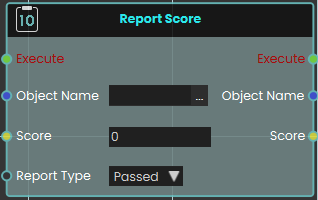
The Report Score node enables the system to register and record a specific value as a score when the node is executed. This is highly useful for tracking user performance, evaluating task completion, or logging quiz results within a training scenario.
The node utilizes the following key parameters to define the recorded data:
-
Object Name: Specifies the name of the exam, task, or specific entity being evaluated.
-
Score: The numerical input field where the final score value is passed or entered.
-
Report Type: A dropdown menu that determines the classification or outcome of the score. The available options are Passed, Scored, and Failed.
The node stores the score and its associated information to be used primarily in the SimLab VR Assessment Portal, where instructors and administrators can securely view and evaluate the reported values.
Example
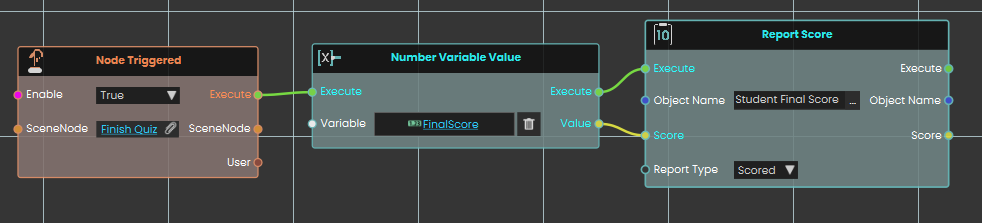
In this example, the system records a student's final score the moment they finish a test.
-
Upon interacting with the "Finish Quiz" object, the Node Triggered event initiates the execution flow.
-
The Number Variable Value node is used to retrieve the current numerical value stored in the
FinalScorevariable. -
This retrieved value is passed directly into the Score input of the Report Score node.
-
The Report Score node is configured with the Object Name set to "Student Final Score" and the Report Type set to "Scored," which officially logs the student's result into the system's evaluation records when executed.