
 3ds
Max plugin, with SimLab quality
3ds
Max plugin, with SimLab quality
SimLab 3D Plugins \ SimLab Plugin for 3ds Max
SimLab Plugin for 3ds Max

About SimLab Plugin for 3ds Max
Benefits
SimLab 3ds Max plugin completes 3ds Max by adding the following great features:
Import/Export
The plugin adds support for the file formats listed below
| File Format | Import | Export |
| 3D PDF |
 |
|
| SolidWorks 2012 and prior |
|
|
| SolidEdge ST4 |
|
|
| U3D |
|
|
|
SketchUp 8 and prior |
|
|
| Rhino (*.3dm) 5 |
|
|
| 3D XML |
|
|
| STEP (*.step, *.stp) |
|
|
| OSG |
|
|
| IPad |
|
|
| DirectX (*.x) |
|
3D PDF export from 3ds Max
SimLab 3ds Max plugin adds 3D PDF export cabability to 3ds Max. Models generated, or modified inside 3ds Max, can be exported in 3D PDF format, with great control over 3D PDF settings. For more information about 3D PDF from 3ds Max, click here.
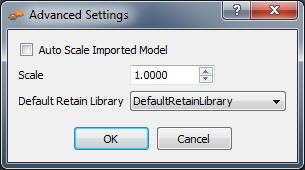
Advanced Settings in SimLab plugin for 3ds Max
In 3ds Max under SimLab menu, the Advanced Settings option provides users with the ability to auto scale imported model(s). Auto scalling scales the model to make it appear clearly in the current view. This option is useful when working with a single model.
In case of dealing with multiple models in the scene, this option should be un checked. In this case the user has the option of applying the desired scale on the imported model(s).
3D PDF importer to 3ds Max
With SimLab 3ds Max plugin, users can now import 3D PDF files into 3ds Max. The imported models can be modified, saved, and they can be exported in any of the formats avaiable by this plugin.
SolidWorks importer to 3ds Max
SolidWorks 2012 parts and assemblies can be imported into 3ds Max, using SimLab 3ds Max plugin. For more information about SolidWorks importer to 3ds Max, click here.
Solid Edge importer to 3ds Max
Solid Edge parts and assemblies can be imported into 3ds Max, using SimLab 3ds Max plugin. For more information about Solid Edge importer to 3ds Max, click here.
Sketchup importer to 3ds Max
SimLab 3ds Max plugin adds SketchUp import cabability to 3ds Max. With this cabability 3ds Max users now have access to all models inside Google's 3D Warehouse. For more information about SketchUp importer to 3ds Max, click here.
Sketchup exporter from 3ds Max
Exporting SketchUp files, is another great capability SimLab 3ds Max plugin adds to its users. For more information about SketchUp exporter from 3ds Max, click here.
Export 3ds Max files to iPad
SimLab 3ds Max plugin adds iPad export cabability to 3ds Max. With this great feature, models generated in 3ds Max can now be shared with iPad users. For more information about Export from 3ds Max to iPad, click here.
Supported platforms
The plug-in is supported on the following versions of 3ds Max (2009, 2010, 2011, and 2012) , (32 and 64 bit).
How to use the plugin?
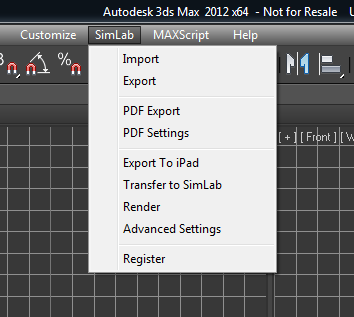
Installing the plugin adds the menu SimLab to 3ds Max. Under this menu users can use the Import, Export, Render, and other functions available by this plugin.
Requesting a trial license
After installing the plugin, start 3ds Max and click the menu SimLab and select Register, which will open the license dialog.
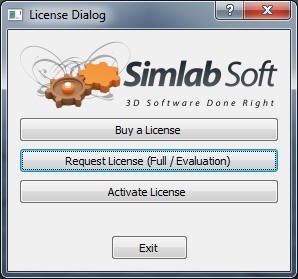
Click Request License (Full / Evaluation), and fill the needed information. If you do not enter a license key, it means you will get a trial license.
Click Auto Request, and the license will be automatically generated and sent to you by email.
After receiving the license, start 3ds Max and select Register from the
SimLab menu, then click Activate License
and select the license file
you received.
Plugin Upgrade
Current users of any of SimLab 3ds Max plugins are eligible for an upgrade for SimLab 3ds Max plugin. The upgrade is only $39, to upgrade please, click here.
Great Value
The price of the professional license of the plugin is $99. With a single professional license; the user is eligible to activate the plugin on two different machines.
The plugin includes a free version of SimLab Composer 3D PDF edition.