 3ds Max plugin, with Simlab quality
Simlab 3D Plugins \ 3D PDF exporter for 3ds Max
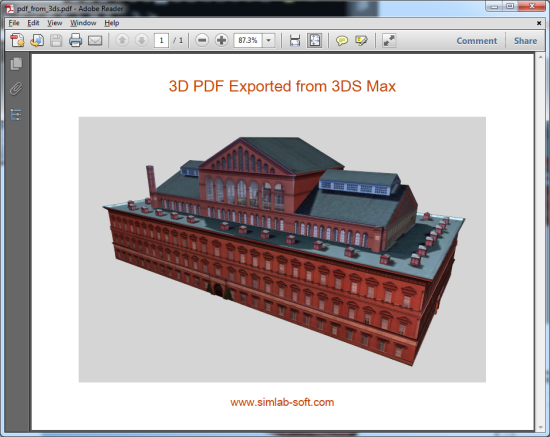
3D PDF from 3ds Max

About 3D PDF from 3ds Max
Benefits
Simlab plugin for 3ds Max, enables users to create 3D PDF files from inside
3ds.
3D PDF files can be opened using the free version of Adobe Acrobat
reader, which is virtually available on every machine.
Sharing 3D models as 3D PDF files, enables designers to
communicate 3D models with technical and none technical users,
without risking the original model, and without requesting from the file
recipient to download any external applications.
How to use the plugin
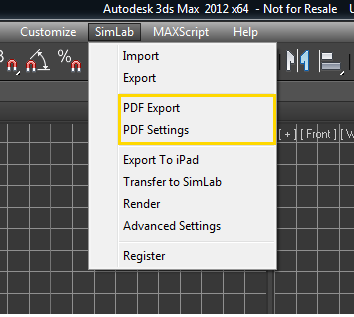
After installing the plugin, it automatically registers itself in Autodesk 3ds Max, and adds the new top level menu SimLab. The user will be able to export 3D PDF files by clicking the menu SimLab -> PDF Export.
OBJ Export Options window will appear. Click Export, and the Exporting OBJ progress window will appear, after finishing click the DONE button.
The PDF Export window will open, select the name and location of the new 3D PDF file, and click Save.

To open the 3D PDF Settings dialog, go to SimLab menu and select PDF Settings. Edit settings, click Save current settings as default, then Close the dialog and select PDF Export.
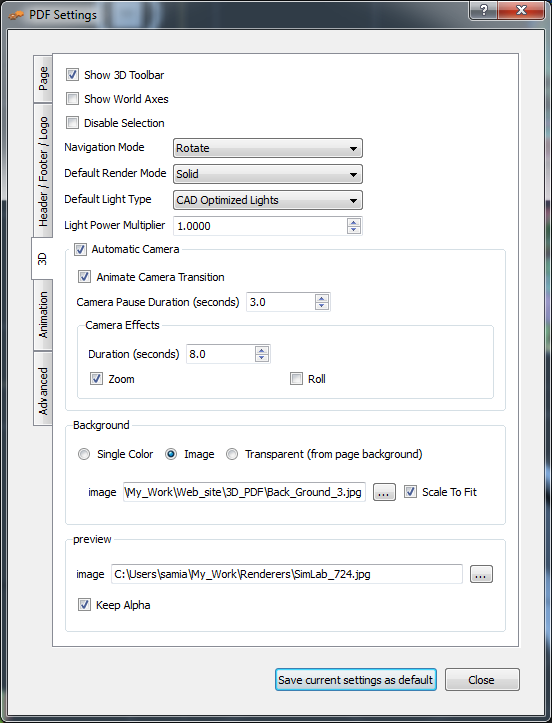
Please click here to download the plugin documentation, which describes the different options available for the users to create great 3D PDF files.
Great Value
The price of the professional license of the plugin is $99. With a single professional license; the user is eligible to activate the plugin on two different machines.
The plugin includes a free version of SimLab Composer 3D PDF edition. For more information about SimLab 3ds Max plugin great features, and how to request a license, click here.