Turn your CAD model into a shareable XR experience — no code.
Import your native CAD, then build a working assembly, a mechanical simulation, or a training scenario — and share it as VR, web, or video with anyone, on any device. One model, one flow, no 3D team.
Fully featured · No credit card required
The whole journey, on one screen
Your model flows through four steps — and never gets remade along the way. Follow it end to end below.
Import
Open your native CAD — assembly tree, materials, and metadata come in intact.
Create (no code)
Rig a working assembly, run a mechanical simulation, or author a training scenario.
Experience
Export the same project as VR, AR, an animated video, a web page, or a 3D PDF.
Share
Send it to any device, or review it live together with your team and clients.
It starts with your model
Bring in native CAD with structure, materials, and metadata intact — then keep it in sync with a live link. No conversion gymnastics, no re-authoring.

Native import, 30+ formats
SolidWorks, Inventor, Fusion 360, CATIA, Creo, Siemens NX, STEP, IGES, Rhino, and more — open your file, no conversion gymnastics.
Assembly & true scale, intact
Structure, materials, and metadata come across intact, at real-world scale and dimensionally accurate — parts stay parts, so what you review is what you engineered.
Live link — your CAD stays the source of truth
Revise the model in your CAD tool and push it downstream in one click. Your interactions and layout work stay intact — no re-export, no double work.
Big assemblies, handled
On PC-VR your workstation drives the fidelity — the stronger the machine, the more it handles. For standalone headsets, a built-in optimization tool decimates meshes and trims polygon count, so even dense, many-part assemblies run smoothly untethered.
Your model's in. Now — what do you make with it? ↓
From one model, build any of three things
A visual, no-code authoring interface — point, click, drag, and pull finishes from a 1000+ material library. No scripting, no 3D team. Choose what your model becomes:
Author an assembly sequence
Lay out the order of assembly and disassembly on a visual node-based system — each step, each part, and the tool needed for it, if any.
Simulate the mechanics
Analyze forces and motion with real data. Physics-driven simulation shows how the design actually moves — then run it live in VR or render it as an animated video.
Author a training scenario
Turn the model into guided training — operating, maintenance, inspection, or troubleshooting — with step-by-step scenarios, quizzes, and virtual instructors.
Training that enforces the right procedure
Guided disassembly and reassembly with logical step order enforced, the correct tool for each part, and ghost placement guides. Ideal for onboarding technicians and teaching real repair and build procedures.
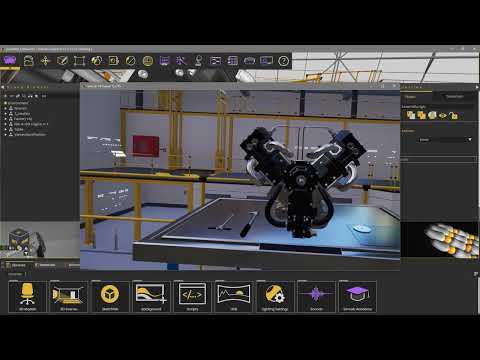
Go further — make your XR data-driven and interactive
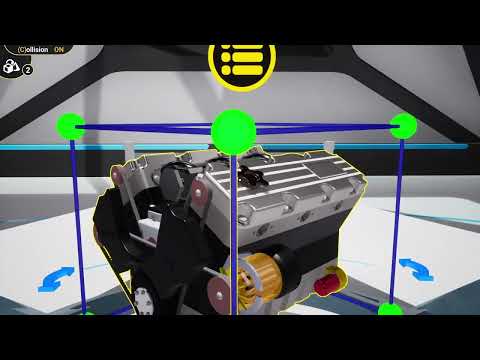 In XR · Model tree
Use the assembly tree inside XR
Select, hide, search, and grab any part from the full model tree — right inside the experience, just as in your CAD tool.
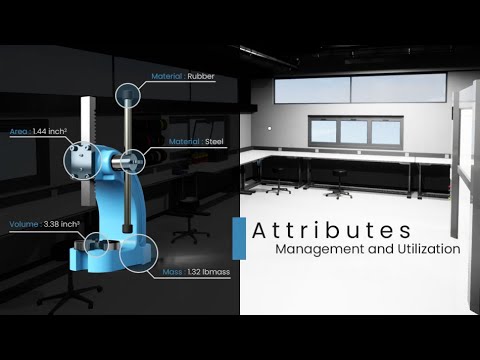 In XR · Metadata
Drive behavior from CAD metadata
Build dynamic experiences using the object attributes already defined in your CAD system — data straight from your model.
Built it once. Now let people experience it. ↓
One build. Every format.
Whatever you created, export it as an immersive experience — no rework between outputs. And because Composer exports to a range of standard 3D file formats, your work is never locked in. Pick the format that fits your audience. See the format list
Immersive VR & AR
Review and operate at true 1:1 scale — catch clearance and ergonomic issues before prototyping.
Interactive 3D PDF
Exploded views, animations, and measurements — opens in any standard PDF reader.
Animated video & renders
Photorealistic renders, 360° grids, and rendered motion straight from your simulation.
Standalone on the floor. Full power at the desk.
Standalone headsets
Optimized cordless performance on Meta Quest 3 and Pico 4 — hand a unit to a technician for mobile safety, assembly, and maintenance training anywhere on the floor.
High-fidelity PC-VR
Drive a headset from a workstation GPU when you need it. Design-review teams load massive, millions-of-polygon datasets at full quality — no decimation.
No headset required. A free viewer runs on Windows, Mac, iOS & Android — so anyone you share with can open the experience on the device already in their hands. VR is an option, never a requirement.
It's built and it runs. Last step — get it to your people. ↓
Get everyone into the same model
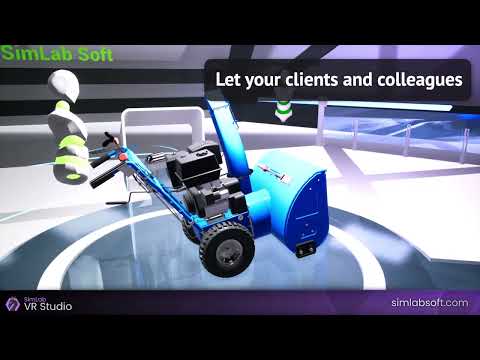
Hand it off with a free viewer, or bring your team and clients into a live session together — review, sign off, and train from anywhere.
Review as a team, in real time
Prove competency, not just completion
Shared a training scenario? The Assessment Portal turns it into evidence — instructors get actionable data to certify workers and satisfy compliance.
Your intellectual property, protected
Author, simulate, and export right on your own machine — nothing is shared without your action. When you choose to share online or collaborate in VR, experiences are hosted on secure, enterprise-grade cloud infrastructure, with end-to-end encryption available on our Enterprise edition.
The practical questions
Which CAD formats can I import?
SolidWorks, Inventor, Fusion 360, CATIA, Creo, Siemens NX, STEP, IGES, Rhino, and more — 30+ native and neutral formats for import, plus a range of 3D formats for export. See the full list
Do my viewers need a VR headset?
No. A free viewer runs on Windows, Mac, iOS, and Android, so anyone can open your experience on the device they already have. VR is optional.
Do I need to know how to code?
No. Authoring is fully visual — point, click, drag. Skill Forge's built-in tutorials get you building on day one.
Can it handle large assemblies?
Yes. On PC-VR your workstation drives the fidelity; for standalone headsets a built-in optimization tool decimates meshes so dense models still run.
How does it stay in sync with my CAD?
Free CAD plugins create a live link — revise in your CAD tool and push the update to Composer in one click, no re-export.
Is my model data secure?
Nothing is shared without your action. When you share online or collaborate in VR, experiences run on enterprise-grade cloud, with end-to-end encryption on the Enterprise edition.
How do I convert SolidWorks to VR?
SimLab Composer imports SolidWorks files (SLDPRT, SLDASM) directly and converts them to VR experiences. Import your model, add interactions with the no-code interface, then export to VR — minutes, not hours.
What is the best 3D model viewer for mechanical CAD?
SimLab Composer provides professional CAD visualization with native support for SolidWorks, CATIA, Inventor, STEP and IGES. Unlike basic viewers it adds full VR, assembly animations and multi-user collaboration, and the free SimLab VR Viewer runs on every platform including Quest and Pico.
How does VR improve design review workflows?
VR design review lets you evaluate at 1:1 scale, spot clearance and ergonomic issues immediately, and understand spatial relationships intuitively. Teams review together in real time with SimLab VR Collaboration, catching issues before manufacturing.
Can I build VR training for assembly procedures?
Yes. Build step-by-step assembly and disassembly procedures with enforced step order, the correct tool per part, ghost placement guides, quizzes and virtual instructors — no programming required.
Which VR headsets does SimLab support?
Experiences run on Meta Quest (2, 3, Pro), Pico (4, Neo 3), HTC Vive, Valve Index, Windows Mixed Reality and PC VR headsets, plus desktop, mobile and tablet for people without a headset.
Can I embed a 3D model on my own website?
Yes. Export to interactive web 3D and embed it in any page — it renders live in the browser with your own branding and watermark, with no plugin or download for the viewer.
A path that moves at your pace
Try it free
21 days, fully featured, no credit card. Import a model and build something today.
Start free trial →See it on your model
Want a hand? We'll build a demo on your actual CAD and walk it through with you.
Book a demo →Roll it out with your team
When you're ready, team and education plans are there. No rush — start a conversation whenever it fits.
Let's talk →One model, all the way
to everyone who needs it.
Import in minutes, create with no code, and share to any device. Start free, or let us show you on your own model.
21 days · Fully featured · No credit card required